
/DYNAMICS 365 BUSINESS CENTRAL
One ERP for the full standard operating process.
Business Central covers the whole standard operating process, from purchase order to period close, without a separate system per function. INFOC implements and supports it for Singapore operations — configuring the standard first and extending only where the operation genuinely differs, so the environment stays on Microsoft's update path.

CHOOSE BY BUSINESS SITUATION
Start with the problem, not a product pitch.
 Business Central Implementation SingaporeMove from fragmented processes to a controlled finance and operations foundation.
  Business Central Upgrade or NAV MigrationModernise the platform without carrying every legacy decision into the future.Explore the route
  Business Central Rescue and RecoveryEstablish what is broken, what is salvageable and how control is restored.
  Business Central Support and OptimisationReplace reactive ticket handling with managed operational improvement.Explore
  Business Central GST InvoiceNow ReadinessAlign tax, invoice data, transmission, exceptions and audit evidence.Explore the route
  Power BI and Microsoft Fabric ModernisationTurn exported reports into governed definitions, models and decisions.Explore Microsoft Copilot and Practical AI ReadinessPrioritise useful AI with data, permission and human-review controls.Explore Replace, Modernise or Stabilise the ERPMake the direction explicit before committing budget, time and people.Read the guide
 WHY BUSINESS CENTRAL
Standardise the operating core before adding complexity
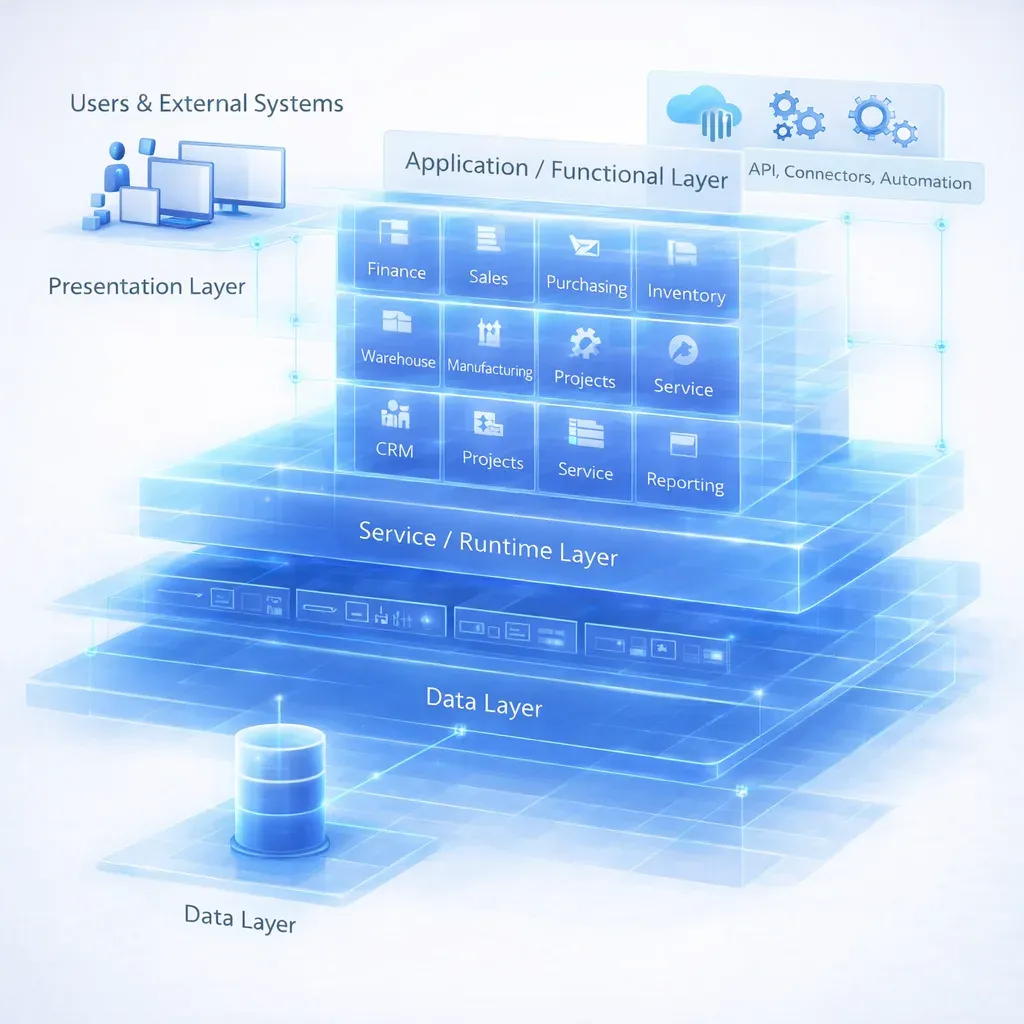
COMPLETE STANDARD PROCESS MAP
Explore the Business Central operating model
Includes the functions ERP marketing pages leave out.
Finance & Record-to-Report
- General ledger, dimensions, budgets and periods
- Receivables, credit and collections
- Payables, payment journals and bank formats
- Cash, reconciliation and cash-flow forecast
- Tax, e-documents and audit trail
- Consolidation, account schedules and reporting
Sales, Customer & Commerce
- Quote-to-order with pricing and availability
- Order-to-cash, returns and application
- Drop shipment and special order
- Subscription and recurring billing
- Customer ledger and credit control
- Commerce and channel connection
Purchasing, Inventory & Warehouse
- Requisition, purchase order and receipt
- Landed cost and vendor management
- Item, variant, location and costing
- Replenishment and planning
- Warehouse receipt, put-away, pick and ship
- Inventory valuation and adjustments
Manufacturing & Assembly
- BOM, routing and versions
- Production orders and capacity
- Material and subcontracting
- Assembly-to-order and to-stock
- Output, consumption and WIP
- Cost calculation and variance
Projects, Service & Assets
- Jobs, tasks, planning and WIP
- Resource, time and expense
- Service orders, contracts and SLAs
- Fixed assets and maintenance
- Project invoicing and recognition
- Profitability and utilisation
Workflow, Administration & Platform
- Approvals, workflow and number series
- Permissions, roles and audit
- Environments, sandbox and release
- APIs, events and integration
- Power Platform and extensions
- Copilot, agents and governance
EDITIONS AND LICENSING
The edition decision is a manufacturing decision
A tenant runs one full-user edition, not a mix, so the choice is made once for the whole company.
FULL USER
Essentials
Finance, sales, purchasing, inventory, warehouse, projects and the Power Platform connection. This covers most distribution, retail and services operations without further licence spend.
FULL USER
Premium
Everything in Essentials plus manufacturing and service management. Required if you run production orders, routings and capacity, or field service contracts with SLAs.
LIGHT USER
Team Members
Read across the company, plus approvals, time entry and updates to records the user owns. Right for managers who approve and review but do not process transactions.
Essentials and Premium full users cannot be mixed in one environment. A company that licenses Essentials to save cost, then finds three months in that the shop floor needs production orders, has to move every full user to Premium, rather than only the three people on the floor. We size this during the fit assessment, before the licence order.
Storage entitlement against your transaction volume and retention policy, whether a shared device licence suits warehouse or shop-floor stations better than named users, and whether a longer commitment term is worth the price lock in your budget cycle. Copilot is included with the full-user licences. List pricing and terms are published by Microsoft and change; we quote against your actual user mix rather than a headline rate.
IMPLEMENTATION APPROACH
Six stages, each one closes with a decision you can act on
Configure the standard first, then extend only where the operation genuinely differs.
Process walkthrough against standard Business Central. Gaps are classified as configuration, extension, third-party app or process change.
Chart of accounts, dimensions, number series, posting groups, locations, item model and approval workflow. The decisions that are expensive to reverse.
Master data first, then open transactions and opening balances. Migrated in cycles so the business sees its own data early, not at UAT.
AL extensions, integrations and reports for the gaps that survived stage 01. Built against the current release, tested against the next one.
Process-based UAT using your transactions and edge cases. Training runs against the configured system, not a demo tenant.
Cutover plan, opening balance reconciliation, first period close supported, then transition to the named support owner.
WHERE YOU ARE COMING FROM
Three starting points, three different projects
What you are replacing changes the risk, not the destination.
LEGACY DYNAMICS
NAV, GP or on-premises BC
The data model is familiar, so migration is tractable. The work is in the customisations: each one is inventoried, rated for rebuild effort, and checked against standard functionality that may have caught up since it was written.
ANOTHER ERP
A different platform
No shared data model, so mapping is the critical path. Chart of accounts, item master and customer master are redesigned rather than lifted. Where the current structure still fits the business, we carry it across rather than change it for its own sake.
NO SYSTEM OF RECORD
Accounting package and spreadsheets
Lowest migration risk, highest process change. The constraint is not data, it is that the operation has never had enforced approvals, posting rules or stock accuracy. Training and change management carry the project.
AI IN BUSINESS CENTRAL
Three levels of AI, and only one of them is free
Copilot ships with the licence. Agents are metered.
Copilot in Business Central
Personal productivity inside the app. Summarise a record, draft a document, explain a figure, find a page or a matching item by describing it. Included with the full-user licences, so the only decision is whether you turn it on and for whom.
Agents
Bounded work executed rather than suggested, through prebuilt agents or ones you build. Priced by consumption, not by seat, which means the business case is a volume question and the budget line is variable. Model it before you enable it.
Copilot extended
Reach beyond the ERP into Microsoft 365, Power Apps, Power Automate, Copilot Studio and Microsoft Foundry. Each carries its own licence and its own governance question. Useful, but not part of the Business Central decision.
The included tier and the metered tier are frequently discussed as one thing. They are not. A pilot that starts with Copilot costs nothing extra; the same pilot extended to agents introduces a consumption line that scales with transaction volume. We size that before enabling anything, not after the first invoice.
WHAT IT ACTUALLY DOES
Six things Copilot does today, and three agents still in preview
Capability, not capability roadmap.
Find by description
Locate a record, a page or a matching product by describing it rather than knowing where it lives. Removes most of the navigation cost for occasional users.
Bank reconciliation
Compare bank statements and incoming e-documents and propose matches. The proposal is reviewed and posted by a person, so the control does not move.
Analysis assist
Organise and pivot data on a page without building a report object. Useful for a question asked once, not a substitute for a governed model.
Drafting
Product descriptions, document text and number series setup. Draft quality depends entirely on the quality of the master data behind it.
Explain and guide
Answer how-to questions in context. This is the capability that most reduces support load in the first quarter after go-live.
Summarise
Condense a record, a history or a document set. Grounded in the user's own permissions, so it cannot surface what that user could not already open.
IN PREVIEW
Sales order agent
Reads a customer request, interprets it, and prepares a quote. Preview status means the behaviour and the terms can still change, so treat it as a candidate for a controlled pilot.
IN PREVIEW
Payables agent
Receives vendor invoices, captures the detail and registers them against your policy and posting history. The same caveat applies, and the approval rule stays where it is.
IN PREVIEW
Expense agent
Captures and codes employee expenses against policy. The narrowest of the three in scope, which also makes it the most realistic first pilot.
All three agents are currently in preview. Preview features are not covered by production service commitments and can change or be withdrawn. We will tell you what is generally available in your region on the day you ask, rather than planning a process around something that is not yet fixed.
FIT AND UPGRADES
Fit, upgradeability and how reporting connects
Can Business Central handle our manufacturing or projects?
Yes, with the Premium edition for manufacturing and service. The standard model covers BOMs, routings, capacity, assembly, jobs, resources, service orders and contracts. Where it stops is deep vertical process, high-volume shop-floor data capture and complex planning, which usually means an AppSource app rather than custom code.
How do you protect upgradeability?
Extensions are written in AL against published APIs and events, never as modifications to base objects. Business Central ships two major updates a year and applies minor updates continuously, so every extension is tested against the next release before it lands. If an extension cannot survive that cadence, it is the wrong solution and we say so at design stage.
How does reporting and AI connect?
Business Central exposes data through APIs and a direct Fabric link. Reporting sits on governed semantic models in Fabric or Power BI rather than on report objects inside the ERP, so definitions are shared with the rest of the business. Copilot is grounded in those approved definitions and in the user's own permissions.
How long does an implementation take?
The honest answer is that it depends on three things: how many legal entities you run, how much of the operation is outside the standard model, and how many systems have to stay connected. A single-entity distribution business on standard processes is a different project from a multi-entity manufacturer with shop-floor integration. The fit assessment produces a range with the assumptions written down, and we would rather give you that than a number we cannot defend.
What happens to our customisations?
Each one is catalogued and given a disposition: rebuild in AL, replace with standard functionality, replace with an AppSource app, or retire. Retirement is more common than clients expect, because requirements written years ago are often covered by the standard product now or reflect a process nobody follows any more.
Do you support multi-entity and multi-currency operations?
Yes. Business Central handles multiple companies with intercompany posting, consolidation and multi-currency as standard. The design decisions that matter are whether entities share a chart of accounts and item master, and how consolidation is run. Those are settled in stage 02, because changing them after go-live means reposting history.
Who owns the environment after go-live?
You do. The tenant, the licences and the extension source are yours. INFOC can operate it under managed services, and many clients do, but that is a service choice rather than a dependency. Nothing in the build is designed to make leaving difficult.
Is there published evidence for the business case?
There is, and it is worth reading with the right expectations. Microsoft reports more than 45,000 companies on Business Central. A 2023 Total Economic Impact study by Forrester Consulting, commissioned by Microsoft, found a 172% return over three years, up to 18% higher productivity and around USD 30,000 a year in avoided third-party fees. Those figures describe a composite organisation built from interviewed customers, not a specific company and not an INFOC client. Use them to frame the question, then let the assessment produce numbers for your own volumes, headcount and current licence spend. We will not quote someone else's return as though it were yours.
Should we wait until our AI strategy is clearer?
Waiting is usually the more expensive option, because the constraint is rarely the AI. Microsoft's 2024 research found 71% of small and medium business leaders consider AI adoption critical to staying competitive, while 61% said their company had no vision for implementing it. That gap is not solved by a strategy document. It closes when the operational data sits in one governed system with clear permissions, at which point the first useful AI capability is already included in the licence you are paying for. Standardise the core, then decide what to automate.
NEXT STEP
Check the fit before committing to a platform
Describe the operation and we will say plainly where standard Business Central fits and where it does not.
