

Practical Manufacturing ERP for Growing Businesses with Microsoft Dynamics 365 Business Central
Manufacturing businesses today are under constant pressure to deliver faster, reduce costs, and maintain product quality — all while managing complex operations. Many growing companies still rely on disconnected systems, spreadsheets, and manual processes, which lead to inefficiencies, errors, and lack of visibility.
This is where Microsoft Dynamics 365 Business Central stands out.
It provides a practical, scalable, and fully connected manufacturing ERP solution that helps businesses manage production end-to-end — without unnecessary complexity.
In this blog, we walk through how Business Central enables modern manufacturing operations, supported by real system screens and a practical demo.
Why Growing Manufacturers Need a Connected ERP System
Disconnected tools create operational chaos. When inventory, production, and sales systems don’t talk to each other, businesses face:
- Inaccurate inventory levels
- Production delays
- Poor demand planning
- Limited visibility into shop floor activities
- Manual errors and rework
The reality is simple:
Manufacturing success today depends on real-time data, automation, and integration.
Microsoft Dynamics 365 Business Central brings all these capabilities into a single platform.
End-to-End Manufacturing in Business Central
Business Central connects every stage of the manufacturing lifecycle:
- Product design and BOM management
- Production planning and scheduling
- Execution through production orders
- Material consumption and output tracking
- Inventory and warehouse integration
1. Product Design with Production BOM
The Production Bill of Materials (BOM) defines what goes into your finished product.
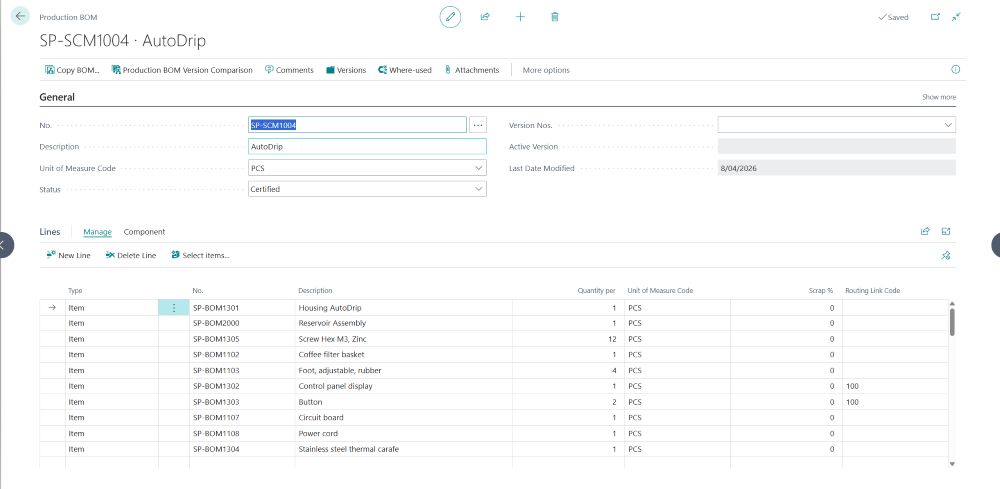
Key capabilities:
- Define multi-level BOM structures
- Track components and quantities
- Manage versions and revisions
- Ensure production consistency
This ensures that every product is built with accuracy and standardization.
2. Smart Production Planning (MRP)
Business Central uses planning worksheets to automatically generate production and purchase suggestions.
What this means for your business:
- Demand-driven planning based on sales orders
- Automatic replenishment suggestions
- Reduced stockouts and overstocking
- Optimized resource utilization
Instead of guessing, you plan with data.
3. Production Orders Lifecycle
Production in Business Central follows a structured lifecycle:
- Planned Production Orders – system-generated suggestions
- Firm Planned Orders – reviewed and approved
- Released Orders – ready for execution
- Finished Orders – completed and posted
This ensures:
- Controlled execution
- Clear visibility of production status
- Better coordination across teams
4. Execution with Production Journal
Unlike complex systems, Business Central simplifies execution using a single Production Journal.
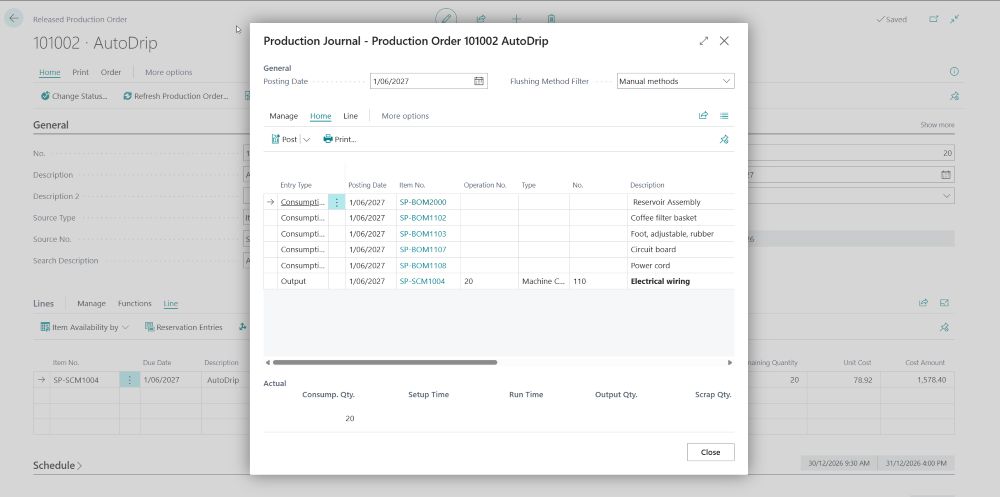
Through the Production Journal, you can:
- Record material consumption
- Track output quantities
- Capture machine and labor time
- Monitor scrap and variances
This provides real-time insight into what’s happening on the shop floor.
5. Assembly Orders for Simpler Manufacturing
Not every business needs complex production routing.
For simpler scenarios, Business Central offers Assembly Orders.
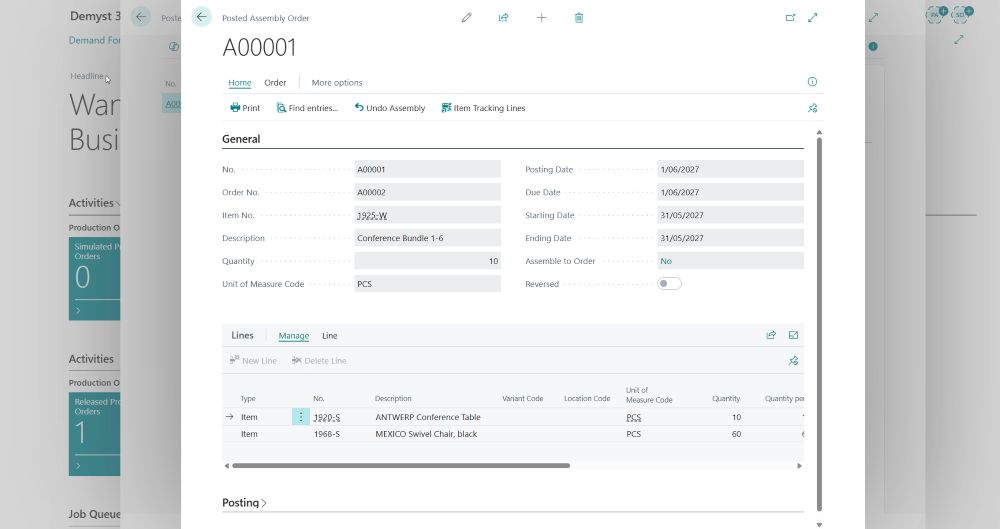
Assembly Orders are ideal for:
- Light manufacturing
- Kitting and bundling
- Make-to-order scenarios
They provide a faster, more flexible alternative to full production orders.
6. Real-Time Visibility Across Operations
Business Central dashboards provide a complete overview of manufacturing performance.
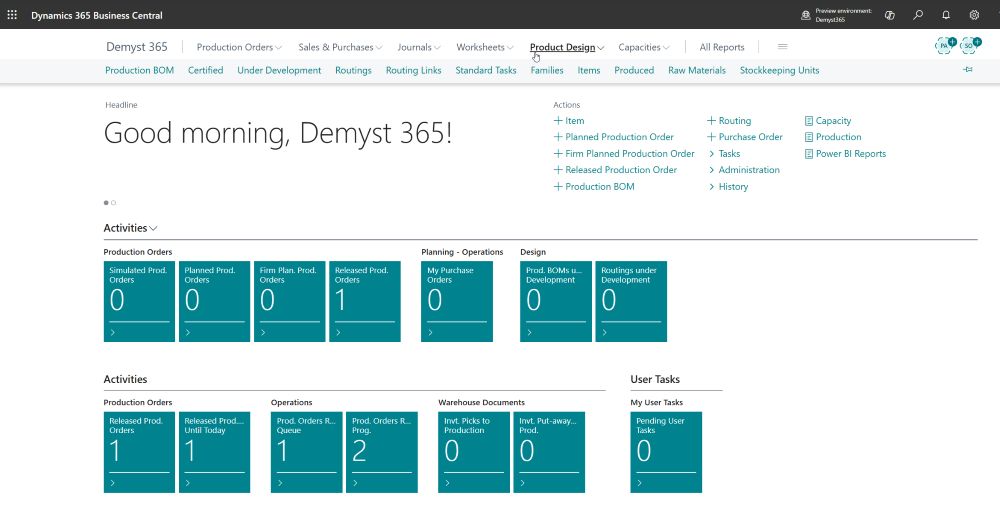
You can track:
- Production order status
- Inventory availability
- Capacity and workload
- Order fulfillment progress
This visibility allows faster decision-making and proactive issue resolution.
Practical Benefits for Growing Businesses
1. Simplified Operations
No more juggling multiple systems. Everything is connected in one platform.
2. Improved Accuracy
Automated processes reduce manual errors in planning and execution.
3. Faster Production Cycles
Real-time tracking helps identify bottlenecks early.
4. Scalability
Start simple and expand as your manufacturing complexity grows.
5. Better Decision-Making
With real-time data, managers can make informed decisions instantly.
Real-World Scenario: From Sales to Production
Let’s look at a practical flow:
- A sales order is created for a finished product
- System triggers demand in planning worksheet
- Production order is generated
- Materials are consumed via Production Journal
- Finished goods are produced and added to inventory
- Order is fulfilled and shipped
This entire process happens seamlessly within Business Central.
Why Business Central is Ideal for Mid-Sized Manufacturers
Many ERP systems are either too basic or overly complex.
Business Central strikes the perfect balance:
- Easy to implement
- Flexible and customizable
- Integrated with Microsoft ecosystem
- Cloud-based and scalable
How INFOC Helps You Succeed
Implementing ERP is not just about software — it’s about transformation.
INFOC helps manufacturers unlock the full potential of Business Central through:
1. Implementation Expertise
- End-to-end deployment
- Industry-specific configurations
2. Process Optimization
- Align ERP with real business workflows
- Eliminate inefficiencies
3. Customization & Integration
- Tailored solutions for your needs
- Integration with third-party systems
4. Training & Support
- User training programs
- Ongoing support and enhancements
5. Scalable Growth Strategy
- Future-ready ERP roadmap
- Continuous improvement approach
Final Thoughts
Manufacturing doesn’t have to be complicated.
With Microsoft Dynamics 365 Business Central, growing businesses can:
- Streamline production
- Improve visibility
- Reduce costs
- Scale efficiently
If you’re still managing production with disconnected systems, now is the time to upgrade to a modern, connected ERP.
Ready to transform your manufacturing operations?
Connect with INFOC and see how Business Central can work for your business.