
You built your first Business Central extension. You know how to set up the AL project, download symbols, write a codeunit, and press F5 to publish. That is the foundation. But building an extension and building it correctly are two different things. In a production environment, with real client data, on a platform that Microsoft updates automatically multiple times a year, the difference matters enormously.
This guide covers the patterns, architecture decisions, and upgrade-safe practices that separate a fragile customisation from a professional, maintainable extension. Everything here uses only Microsoft Learn references and has been validated on Business Central version 28 running on a live sandbox environment.
What you will learn in this guide
- ✓ Table extension vs new table — when to use each
- ✓ Page extensions — adding fields and actions to existing BC pages
- ✓ Event subscribers — the right way to hook into BC logic
- ✓ Upgrade safety — ObsoleteState, versioning, and what breaks
- ✓ Per-Tenant vs AppSource — the deployment decision
- ✓ Reusable patterns consultants use on every project
- ✓ GitHub Copilot — how AI accelerates all of the above
1. Understanding the extension model in Business Central
Business Central is built on a strict no-touch policy for base application objects. You cannot — and should not — modify Microsoft’s tables, pages, or codeunits directly. Instead, BC exposes a layered extensibility model. Your code sits above the base layer, communicates through published interfaces, and stays completely separate from Microsoft’s source code.
This is not a limitation. It is the reason your extensions survive every automatic BC update. When Microsoft ships a new version, they update the base layer. Your extension layer, built on top, is unaffected — as long as you follow the patterns.
The four primary extension objects in AL are:
| Object type | Purpose | Use when |
|---|---|---|
| tableextension | Add fields to an existing BC table | Data is logically part of an existing entity |
| pageextension | Add fields/actions to an existing BC page | UI changes to standard pages |
| table | Create a brand new data entity | Entirely new concept with no BC base table |
| codeunit | Business logic with no UI | Processing, validation, event handling |
2. Table extension vs new table — making the right choice
This is the most common decision developers get wrong on their first project. The rule is straightforward: if your data belongs to an existing BC entity, extend its table. If your data represents a completely new entity, create a new table.
Example of a table extension — correct use:
You want to store a preferred communication channel and contract expiry date against each customer. This data belongs to the Customer entity. Extend table 18.
tableextension 50100 "Customer Contract Ext" extends Customer
{
    fields
    {
        field(50100; "Preferred Channel"; Text[50])
        {
            Caption = 'Preferred Channel';
            DataClassification = CustomerContent;
            ToolTip = 'Specifies the preferred communication channel.';
        }
        field(50101; "Contract Expiry Date"; Date)
        {
            Caption = 'Contract Expiry Date';
            DataClassification = CustomerContent;
            ToolTip = 'Specifies the date the customer contract expires.';
        }
        field(50102; "Contract Value"; Decimal)
        {
            Caption = 'Contract Value';
            DataClassification = CustomerContent;
            AutoFormatType = 1;
            ToolTip = 'Specifies the monetary value of the customer contract.';
        }
    }
}
Notice three things in this code. Field IDs start at 50100 — always use the 50000 to 99999 range for custom objects to avoid conflicts with Microsoft. DataClassification is set to CustomerContent on every field — this is a GDPR compliance requirement in BC; omit it and your AppSource submission will fail. And every field has a ToolTip — mandatory for AppSource certification and good practice regardless.
Example of a new table — correct use:
You need to track supplier portal requests — a concept that has no equivalent in BC. Create a new table with its own primary key and data lifecycle.
A new table requires a clustered primary key, owns its own data completely, and is unaffected by any BC base table changes. Microsoft Learn provides full guidance on table object syntax and key definitions.
Reference: Microsoft Learn — Table extension object | Microsoft Learn — Table object
3. Page extensions — adding fields and actions the right way
Once you have extended the table, you need to make those fields visible to users. A page extension lets you add fields, actions, and layout changes to any existing BC page without replacing it.
pageextension 50100 "Customer Card Contract Ext" extends "Customer Card"
{
    layout
    {
        addlast(General)
        {
            field("Preferred Channel"; Rec."Preferred Channel")
            {
                ApplicationArea = All;
                ToolTip = 'Specifies the preferred communication channel.';
            }
            field("Contract Expiry Date"; Rec."Contract Expiry Date")
            {
                ApplicationArea = All;
                ToolTip = 'Specifies when the customer contract expires.';
            }
            field("Contract Value"; Rec."Contract Value")
            {
                ApplicationArea = All;
                ToolTip = 'Specifies the monetary value of the contract.';
            }
        }
    }
    actions
    {
        addlast(processing)
        {
            action(SendContractReminder)
            {
                ApplicationArea = All;
                Caption = 'Send Contract Reminder';
                Image = Email;
                trigger OnAction()
                begin
                    Message('Reminder sent for %1', Rec.Name);
                end;
            }
        }
    }
}
The addlast(General) instruction places the new fields at the end of the General FastTab — exactly where a user would expect contract-related information. You can also use addafter, addbefore, and addfirst to position fields precisely relative to existing ones.
ApplicationArea = All makes fields visible across all BC experience tiers — Essential and Premium. If you omit this, your fields will not appear to users on certain licence types.
Reference: Microsoft Learn — Page extension object | Microsoft Learn — Actions overview
4. Event subscribers — the correct way to hook into BC logic
This is where the BC extensibility model truly separates itself from older ERP customisation approaches. In legacy C/AL development, you modified base codeunit triggers directly. Every update from Microsoft could overwrite your changes. That era is over.
Business Central publishes events at key moments throughout its business processes — before a document is posted, after a record is inserted, when a sales order is released. Your extension subscribes to those events. Your code runs automatically at the right moment, without you having touched a single line of Microsoft’s source code.
Real-world example — trigger an approval when a sales order is released:
codeunit 50100 "Contract Event Handler"
{
    [EventSubscriber(ObjectType::Codeunit,
                     Codeunit::"Release Sales Document",
                     'OnAfterReleaseSalesDoc', '', false, false)]
    local procedure OnAfterReleaseSalesDoc(
        var SalesHeader: Record "Sales Header")
    begin
        if SalesHeader."Document Type" =
           SalesHeader."Document Type"::Order then
            SendInternalApprovalRequest(SalesHeader);
    end;

    local procedure SendInternalApprovalRequest(
        var SalesHeader: Record "Sales Header")
    begin
        Message('Approval triggered for Order %1', SalesHeader."No.");
    end;
}
The EventSubscriber attribute binds your procedure to a specific event published by Microsoft’s Release Sales Document codeunit. Every time a sales order is released anywhere in BC — from any page, any API call, any background job — your code runs. Replace the Message() call with a real action: send an email, post to Teams, create an approval workflow entry, call an external API.
Validation pattern — block a record insert:
The same event model lets you enforce business rules at the data layer, before anything is saved.
[EventSubscriber(ObjectType::Table, Database::Customer,
                 'OnBeforeInsertEvent', '', false, false)]
local procedure ValidateCustomerOnInsert(
    var Rec: Record Customer; RunTrigger: Boolean)
begin
    if Rec."Preferred Channel" = '' then
        Error('Preferred Channel must be set before saving customer %1.',
              Rec."No.");
end;
This fires before any Customer record is inserted — from the UI, from an API, from a data migration job. The validation is universal and upgrade-safe.
Reference: Microsoft Learn — Events in AL | Microsoft Learn — Subscribing to events
5. Upgrade safety — what it means in practice
Business Central SaaS updates automatically. Minor updates ship monthly; major versions ship twice a year. Your extension runs on every one of those versions, automatically, without you doing anything — unless your code breaks.
Microsoft uses an ObsoleteState property to signal when they are deprecating objects, fields, or procedures. This gives you a migration window before they remove something your extension depends on.
field(50103; "Legacy Ref Code"; Code[10])
{
    ObsoleteState = Pending;
    ObsoleteReason = 'Replaced by Contract Expiry Date (50101). Remove after 2027-01.';
    ObsoleteTag = '24.0';
}
There are three states: No (active), Pending (compiles with a warning — consumers should migrate away), and Removed (will not compile — breaking change). When you see a pending-obsolete warning in VS Code while writing AL code against the base symbols, that is Microsoft telling you to update your reference before the next major release.
Your own app.json version number also matters for upgrade safety. BC enforces a strict version increment policy — you cannot install a lower version over a higher one. Use semantic versioning: Major.Minor.Build.Revision. Increment the major version for breaking schema changes.
Reference: Microsoft Learn — Obsolete attribute | Microsoft Learn — app.json reference
6. Per-Tenant vs AppSource — choosing the right deployment path
Once your extension is ready, you face a critical decision that many developers make incorrectly. Choosing the wrong deployment model costs time, money, and in some cases forces a full rewrite.
Per-Tenant Extension (PTEx)
Deploy today. No review process.
- ✓ Installs instantly into one client’s BC environment
- ✓ No Microsoft review or approval needed
- ✓ Ideal for client-specific logic, custom fields, unique workflows
- ✓ Cannot be listed on AppSource
- ✓ Managed through BC Admin Centre
Best for: consulting projects, one-client solutions
AppSource Extension
Listed on Microsoft’s global marketplace.
- ✓ Technical validation — code and functionality review
- ✓ Go-to-market readiness — marketing and sales preparation
- ✓ Microsoft partner vetting and certified approval
- ✓ Sold to any BC customer worldwide
- ✓ Requires significant investment in testing and documentation
Best for: ISV products, multi-client solutions
The simple rule: if you are building for one client, use per-tenant. If you are building a product you intend to sell to hundreds of clients, invest in AppSource. Trying to take a per-tenant extension to AppSource later without architectural planning is one of the most common and costly mistakes in BC development.
Reference: Microsoft Learn — AppSource submission checklist | Microsoft Learn — Install and uninstall extensions
7. Reusable patterns every BC developer should know
After building extensions across multiple clients, certain patterns emerge that work reliably in almost every project. Here are four that experienced BC consultants reach for repeatedly.
Pattern 1 — Auto-populate from a setup table
Never hardcode business rules directly into your extension logic. Store configuration values in a setup table — one record per company — and read from it at runtime. This makes your extension configurable without code changes.
trigger OnValidate()
var
    ContractSetup: Record "Contract Extension Setup";
begin
    if ContractSetup.Get() then
        Rec."Preferred Channel" := ContractSetup."Default Channel";
end;
Pattern 2 — Block posting with custom validation
One of the most frequently requested customisations: prevent a document from posting unless a business condition is met. Subscribe to the OnBeforePostSalesDoc event and throw an error if your condition fails.
[EventSubscriber(ObjectType::Codeunit,
                 Codeunit::"Sales-Post",
                 'OnBeforePostSalesDoc', '', false, false)]
local procedure BlockPostIfNoApproval(
    var SalesHeader: Record "Sales Header")
begin
    if SalesHeader."Approval Status" <>
       SalesHeader."Approval Status"::Approved then
        Error('Sales Order %1 must be approved before posting.',
              SalesHeader."No.");
end;
Pattern 3 — Call an external REST API
BC has a built-in HttpClient data type — no external libraries required. Use it to call any REST endpoint from a codeunit. Note that external calls require the target URL to be declared in the allowedExternalUrls property in app.json for AppSource extensions.
procedure CallExternalAPI(EndpointUrl: Text; Payload: Text): Text
var
    HttpClient: HttpClient;
    HttpContent: HttpContent;
    HttpResponse: HttpResponseMessage;
    ResponseText: Text;
begin
    HttpContent.WriteFrom(Payload);
    HttpClient.Post(EndpointUrl, HttpContent, HttpResponse);
    HttpResponse.Content.ReadAs(ResponseText);
    exit(ResponseText);
end;
Reference: Microsoft Learn — HttpClient data type
Pattern 4 — Add a custom FactBox to an existing page
FactBoxes are the information panels on the right side of most BC pages. You can add your own using a page extension, pointing to a custom Card Part page that shows related data from your extension tables. This pattern is widely used for showing summary information — contract status, integration logs, approval history — without cluttering the main page layout.
8. GitHub Copilot for AL development — the right way to use it
GitHub Copilot does not replace your understanding of AL patterns. It accelerates the implementation of patterns you already know. The quality of what Copilot generates is directly proportional to the precision of your prompt.
A vague prompt like “create a BC extension” produces generic scaffolding. A precise, business-focused prompt produces production-ready code. Here is an example of a prompt that generates the complete Customer Contract Tracker project structure shown throughout this guide:
Create a Business Central AL extension project in the current folder.
Publisher: INFOC | Name: Customer Contract Tracker | Version: 1.0.0.0
Target: Cloud | ID range: 50100–50149
Objects required:
1. tableextension 50100 on Customer (18): fields Preferred Channel (Text[50]), Contract Expiry Date (Date), Contract Value (Decimal) — DataClassification = CustomerContent on all fields
2. pageextension 50100 on “Customer Card”: show all 3 fields in General FastTab using addlast, ApplicationArea = All, ToolTip on every field
3. codeunit 50100 “Contract Event Handler”: subscribe to OnAfterReleaseSalesDoc, warn if Contract Expiry Date is empty or past today
4. codeunit 50101 “Contract Validation”: subscribe to OnBeforeInsertEvent on Customer, error if Preferred Channel is blank
5. app.json and launch.json for sandbox environment “Demyst365”
Folder structure: src/Tables, src/Pages, src/Codeunits
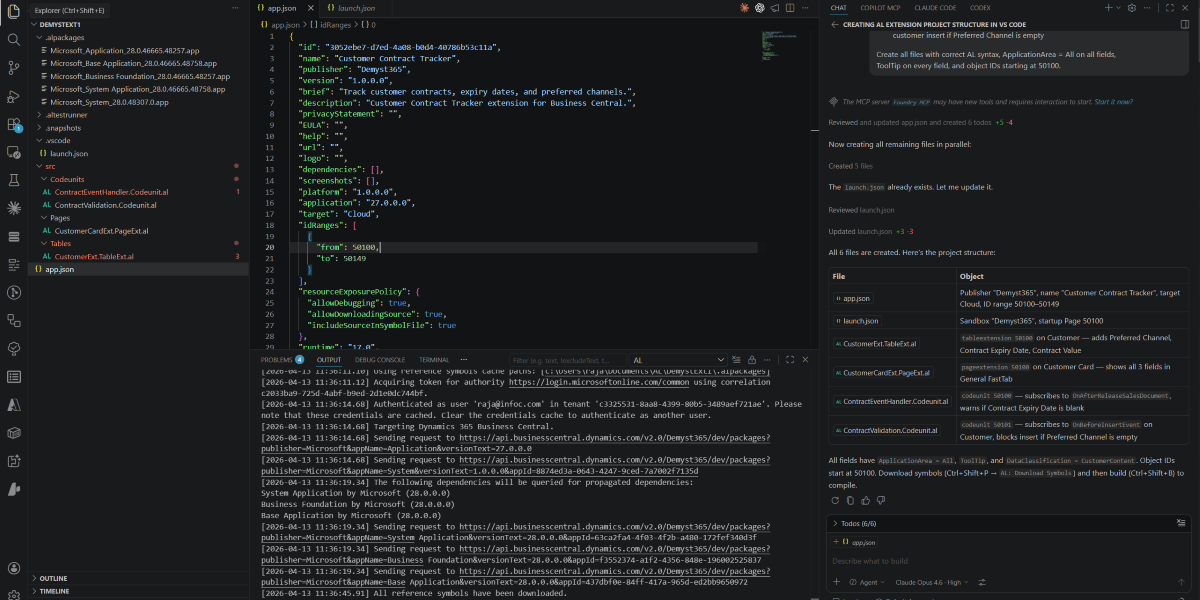
This prompt specifies publisher, ID range, target environment, every object required, data classification requirements, event names, and folder structure. Copilot generated a complete, compilable project from this single prompt — including the DataClassification and ToolTip properties that many developers omit manually.
Your role as the developer shifts from writing boilerplate to reviewing, refining, and ensuring the generated code follows the patterns covered in this guide. That is a significantly more valuable use of your time.
How INFOC can help
At INFOC, we design and deliver Business Central extensions for clients across Singapore and the region. From custom field extensions and workflow automation to full ISV AppSource products, our certified AL developers follow every pattern covered in this guide — on every project.