
This blog is for operations leaders, supply chain teams, warehouse managers, business owners, finance teams, and ERP decision-makers who want better inventory visibility, stronger stock control, and a more structured approach to inventory planning in Microsoft Dynamics 365 Business Central.
- Business Central helps businesses manage item records, stock visibility, locations, movements, planning, and reporting in one connected ERP workflow.
- It improves inventory control by linking item setup, stock position, replenishment, and reporting across operations.
- It supports better decision-making by giving teams more accurate inventory visibility across the business.
Inventory is one of the clearest indicators of how well business operations are running. When stock is not visible or controlled, businesses feel it quickly through delays, stockouts, excess inventory, poor fulfillment, and unreliable planning.
Microsoft Dynamics 365 Business Central helps solve that by bringing inventory records, stock movements, availability, replenishment, and reporting into one connected ERP environment. This gives operations and leadership teams a more dependable way to manage inventory across the business.
What inventory management covers in Business Central
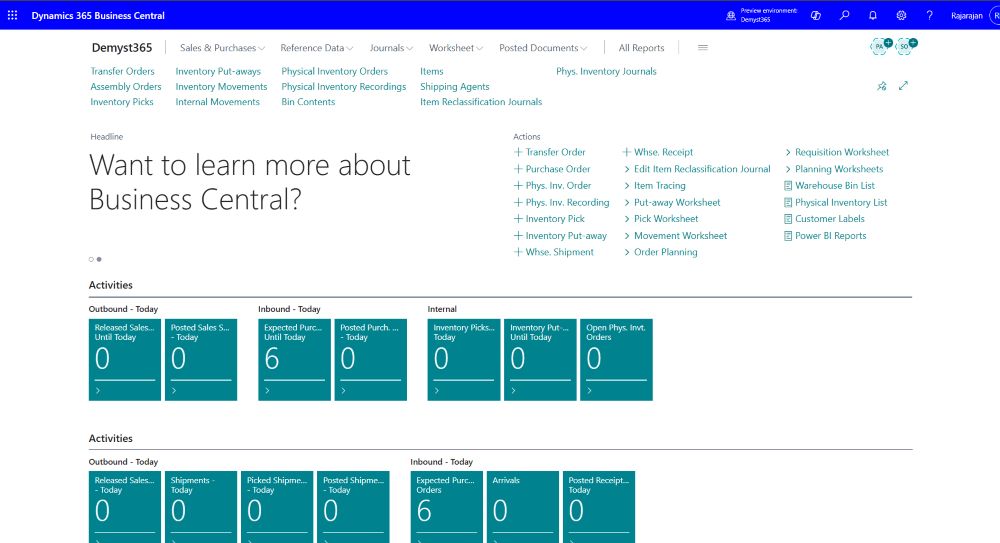
Business Central supports core inventory processes through item records, item cards, locations, item ledger entries, availability views, planning worksheets, replenishment logic, and inventory reporting. This helps businesses move beyond static stock lists and into a more structured inventory management process.
That matters because inventory is not just an operational concern. It directly affects fulfillment, customer service, working capital, and financial reporting.
Item records and item setup
Inventory management begins with clean item records. Business Central gives teams a structured way to manage products, stock-related information, and item-level visibility inside ERP.
When item records are well managed, operations teams gain more control over stock accuracy, reporting becomes more dependable, and inventory-related processes become easier to scale.
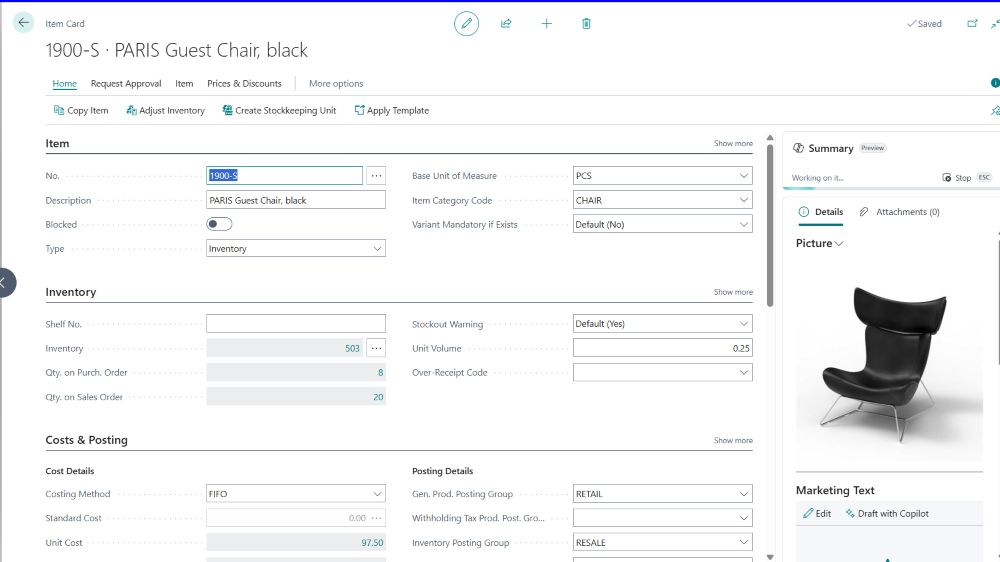
Item card and inventory detail
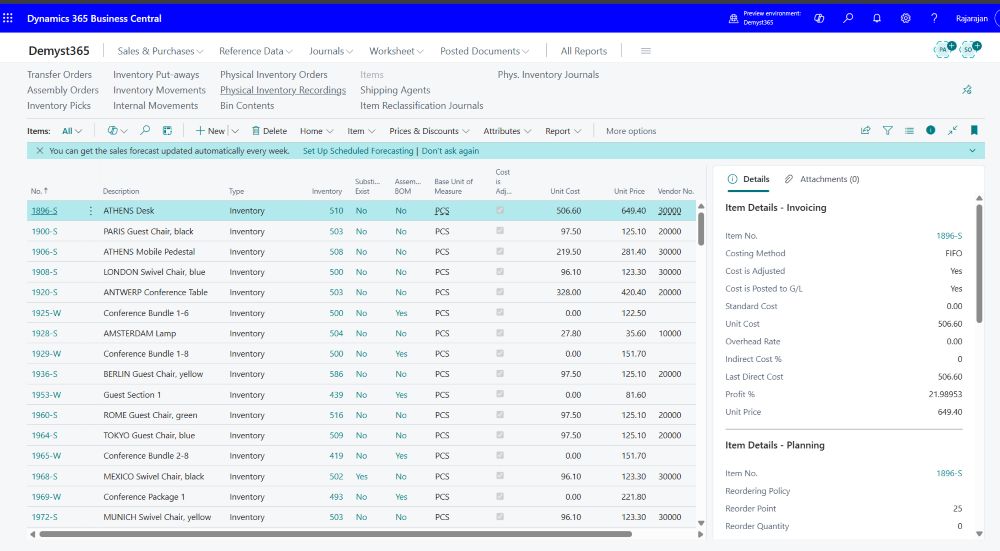
The item card brings together the information needed to manage inventory more consistently, including product setup, units of measure, costing-related fields, and planning data.
This gives businesses a stronger operational foundation because item-level decisions affect purchasing, sales, warehouse activity, and financial treatment.
Locations and stock visibility
Locations help businesses manage inventory across warehouses, branches, and operational sites. This is important because stock is rarely held in one place, and visibility across multiple locations is essential for fulfillment and planning.
Business Central improves that visibility by helping teams understand where stock is held and how availability differs across the organization.
Inventory movements and item ledger entries
Inventory control is not just about current stock levels. Businesses also need to understand how stock is moving. Business Central uses item ledger entries to track inventory receipts, adjustments, consumption, and sales-related movement over time.
This helps both operations and finance teams improve traceability, support stock accuracy, and understand how inventory is actually changing across the business.
Inventory availability
Inventory availability helps teams understand what stock is actually available, not just what exists in the system. This supports better fulfillment decisions, clearer customer communication, and more realistic stock planning.
For growing businesses, availability visibility is one of the most practical inventory advantages because it reduces the risk of overpromising or understocking.
Planning and replenishment
Planning and replenishment are where inventory management becomes more proactive. Business Central helps businesses move beyond reactive stock handling by supporting planning based on demand, stock levels, and reordering policies.
This allows organizations to maintain more appropriate inventory levels while reducing excess stock and improving service readiness.
Inventory reporting and analysis
Inventory reporting helps leadership and operations teams understand stock value, movement patterns, and inventory exposure. This matters because inventory is not just an operational asset. It has direct financial impact as well.
By improving visibility into inventory valuation and related reporting, Business Central supports better operational and financial decision-making.
Useful business benefits of inventory management in Business Central
- Better stock visibility across the business
- Cleaner item records and inventory structure
- Improved control over stock movements
- More accurate availability for fulfillment and planning
- More proactive replenishment and purchasing decisions
- Better coordination between warehouse, operations, and finance
- Stronger inventory reporting and valuation visibility
- Improved operational efficiency and service levels
Business benefits by audience
For operations leaders
- Better control over stock levels and movement
- Improved coordination across inventory processes
- Better visibility into operational bottlenecks
- Stronger support for service and fulfillment performance
For supply chain and warehouse teams
- Clearer stock visibility by item and location
- More dependable movement tracking
- Better replenishment planning
- Reduced stock discrepancies and manual work
For business owners
- Better visibility into inventory-related exposure
- Improved balance between stock availability and cost
- Stronger alignment between operations and financial performance
- More confidence in inventory-driven decisions
For finance teams
- Better visibility into inventory valuation
- Cleaner connection between inventory and financial reporting
- Improved understanding of stock-related financial impact
- Stronger support for audit and reconciliation processes
Video overview
Watch this quick walkthrough to see how Business Central supports items, stock visibility, locations, inventory movements, planning, and reporting:
Practical leadership takeaway
Business Central helps businesses connect inventory records, stock visibility, movement tracking, planning, and reporting in one system. Instead of handling inventory through fragmented tools, the business gains a more structured and reliable way to manage stock and support operational performance.
For growing organizations, that means better stock control, stronger planning, and clearer visibility into how inventory affects both operations and financial outcomes.
How INFOC can help
At INFOC, we help businesses implement, optimize, integrate, and extend Microsoft Dynamics 365 Business Central so inventory processes work more effectively from item setup and stock visibility to planning, reporting, and operational decision-making.
That includes support across ERP and CRM Consulting, Technology Consulting, Enterprise Integration, and broader operational transformation initiatives.